Objective
In this section, the following workflow is verified directly using real network traffic.
- Attack requests originating from a local workstation
- Suricata detects the attacks and generates alert events
- When the same rules are switched to drop mode, actual traffic blocking is confirmed (IPS verification)
This lab demonstrates not just that rules exist, but that they actively control real network flows.
Overall Lab Flow
- Configure a private web server dedicated to attack testing
- Review attack concepts and prepare vulnerable endpoints
- Generate attacks from a local workstation
- Verify Suricata alert logs
- Switch rules to drop mode
- Retry the same attacks and confirm blocking
1. Private Web Server for Attack Testing
Prerequisites
- The web server is located in a private subnet
- No direct public access
- External communication is possible only through the NAT Instance
- SSH access method: choose one of the following
- NAT Instance (jump host)
- AWS Systems Manager (SSM)
- Bastion host
2. Apache + PHP Installation (Lightweight and Suitable for Testing)
# apt update
# apt -y install apache2 php libapache2-mod-php curl
# systemctl enable apache2
# systemctl start apache2
Verification:
# systemctl status apache23. Test Web Root Setup
# cd /var/www/html
# rm -f index.html
3.1 Baseline Page for Normal Traffic
# tee /var/www/html/index.php <<'EOF'
<?php
echo "<h1>Suricata IPS/IDS Test Web Server</h1>";
echo "<p>Client IP: " . $_SERVER['REMOTE_ADDR'] . "</p>";
echo "<p>User-Agent: " . $_SERVER['HTTP_USER_AGENT'] . "</p>";
?>
EOF
This page serves as the baseline for normal HTTP traffic.
Accessing this endpoint should not generate any alerts.
4. Vulnerable Endpoints for Attack Testing
⚠️ Warning: The following code is intentionally vulnerable.
It must never be deployed in a production environment.
4.1 SQL Injection Test
Concept
SQL Injection forces user input to be interpreted as part of an SQL statement.
Suricata detects patterns such as:
UNION SELECT- SQL comment patterns
Vulnerable Page
# tee /var/www/html/sqli.php <<'EOF'
<?php
$id = $_GET['id'] ?? '1';
$query = "SELECT * FROM users WHERE id = $id";
echo "Query: $query";
?>
EOF
4.2 XSS (Cross-Site Scripting)
Concept
XSS causes user input to be rendered directly as HTML or JavaScript.
Suricata actively monitors and detects patterns such as:
<script>alert(- Event handlers (
onerror=,onload=)
Vulnerable Page
# tee /var/www/html/xss.php <<'EOF'
<?php
echo "Input: " . ($_GET['q'] ?? '');
?>
EOF
4.3 Command Injection
Concept
Command Injection executes OS-level commands through web requests.
From an IPS perspective, this traffic requires immediate blocking.
Vulnerable Page
# tee /var/www/html/cmd.php <<'EOF'
<?php
$cmd = $_GET['cmd'] ?? 'id';
system($cmd);
?>
EOF
5. Generating Attack Traffic from a Local Workstation
All attacks follow this path:
Local workstation → NAT Instance → Suricata → Private web server
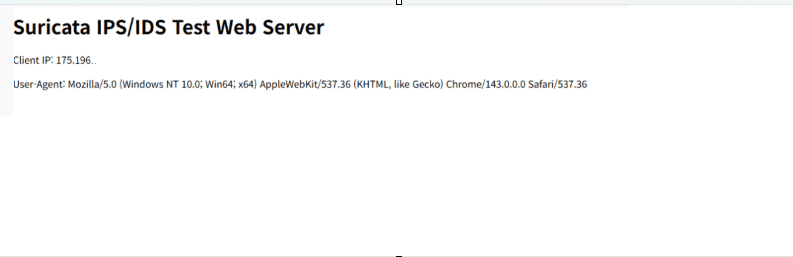
5.1 Normal Page Access
From a local browser:
http://<NAT_PUBLIC_IP>/Confirm that the page loads normally.
5.2 SQL Injection Attack
Enter directly in the browser address bar:
http://<NAT_PUBLIC_IP>/sqli.php?id=1' UNION SELECT 1,version() --
5.3 XSS Attack
http://<NAT_PUBLIC_IP>/xss.php?q=<script>alert(1)</script>

5.4 Command Injection Attack
http://<NAT_PUBLIC_IP>/cmd.php?cmd=cat /etc/passwd

5.5 Malicious User-Agent Attack
macOS / Linux
# curl -A "sqlmap/1.7" http://<NAT_PUBLIC_IP>/Windows PowerShell
PS C:\Users\User> curl.exe -A "sqlmap/1.7" http://<NAT_PUBLIC_IP>/6. Suricata Alert Log Verification
Filter Suricata alert events:
# jq 'select(.event_type=="alert") | .alert.signature' /var/log/suricata/eve.jsonAll events should display signatures corresponding to the attacks above.

7. Switching from Alert to Drop
Up to this point, Suricata has been verified to detect attack traffic using alerts.
Now the same traffic is actively blocked by switching the rules to drop mode.
One important rule applies here:
The suricata.rules file must never be modified directly.
This file is overwritten every time suricata-update runs and is not intended for manual changes in either lab or production environments.
Instead, drop rules are defined using a local custom rule file (local.rules).
7.1 Rule Loading Structure Verification
Check where Suricata loads rule files from:
# grep -nE 'default-rule-path|rule-files' /etc/suricata/suricata.yaml
This indicates that:
- Suricata searches for rule files under
/var/lib/suricata/rules - Only files listed under
rule-filesare loaded
7.2 Create local.rules
# touch /var/lib/suricata/rules/local.rules
# chmod 644 /var/lib/suricata/rules/local.rules
At this stage, the file exists but is not yet loaded.
7.3 Enable local.rules in suricata.yaml
Explicitly instruct Suricata to load local.rules.
# vi /etc/suricata/suricata.yamlLocate:
default-rule-path: /var/lib/suricata/rules
rule-files:
Configure the rule order so that:
suricata.rulescontains ET default rules (alert-focused, auto-updated)local.rulescontains manually managed custom rules (including drop)
By placing local.rules after suricata.rules, local rules take precedence when conditions overlap.
7.4 Writing Drop Rules (local.rules)
Edit the file:
# vi /var/lib/suricata/rules/local.rulesSQL Injection Drop Rule Example
drop http any any -> $HOME_NET any (msg:"LOCAL DROP SQLi UNION SELECT"; content:"UNION SELECT"; http_uri; nocase; sid:9000003; rev:1;)Malicious User-Agent (sqlmap) Drop Rule Example
drop http any any -> $HOME_NET any (msg:"LOCAL DROP sqlmap User-Agent"; content:"sqlmap"; http_user_agent; nocase; sid:9000002; rev:1;)7.5 Rule Syntax Check
Always validate rule syntax before applying changes.
# suricata -T -c /etc/suricata/suricata.yaml -vIf you see the output below, it is working correctly.

Do not proceed if any errors are reported.
7.6 Restart Suricata
1.Stop the existing service
# systemctl stop suricata

2.Ensure all processes are terminated
# ps -ef | grep suricata | grep -v grep | awk '{print $2}' | xargs kill -9 2>/dev/null

3.Remove stale PID file (to prevent restart errors)
# rm -f /var/run/suricata.pid

4.Run in inline mode in the background
# suricata -c /etc/suricata/suricata.yaml -q 0 -D

5.ps -ef | grep suricata
# ps -ef | grep suricata
7.7 Verify Drop Behavior
Generate the same attacks again from the local workstation.
http://<NAT_PUBLIC_IP>/sqli.php?id=1' UNION SELECT 1,version() --PS C:\Users\User> curl.exe -A "sqlmap/1.7" http://<NAT_PUBLIC_IP>/Expected results:
- Page load fails in the browser
- Connection is reset or terminated


Check Suricata logs:
# jq 'select(.event_type=="alert") | .alert.signature' /var/log/suricata/eve.json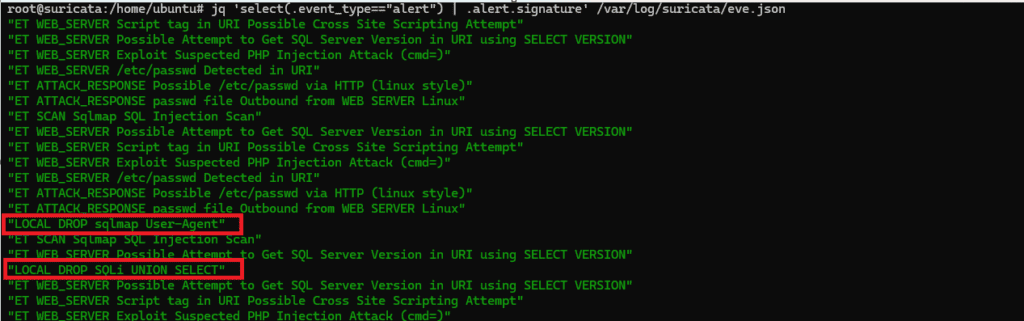
7.8 Summary
At this stage, the following has been confirmed:
- Attack traffic was observed at the alert stage
- The same rule conditions were switched to drop
- Actual network traffic was immediately blocked
This confirms that Suricata is operating correctly as an inline IPS, not merely as an IDS.
8. Final Summary
The key takeaway of this lab is simple:
Attack traffic originating externally passes through the NAT Instance and is actively blocked by Suricata operating as an inline IPS.
In the next section, this traffic will be filtered and visualized using an ELK stack installation and configuration guide.
🛠 마지막 수정일: 2025.12.30
ⓒ 2026 엉뚱한 녀석의 블로그 [quirky guy's Blog]. All rights reserved. Unauthorized copying or redistribution of the text and images is prohibited. When sharing, please include the original source link.
💡 도움이 필요하신가요?
Zabbix, Kubernetes, 그리고 다양한 오픈소스 인프라 환경에 대한 구축, 운영, 최적화, 장애 분석,
광고 및 협업 제안이 필요하다면 언제든 편하게 연락 주세요.
📧 Contact: jikimy75@gmail.com
💼 Service: 구축 대행 | 성능 튜닝 | 장애 분석 컨설팅
📖 E-BooK [PDF] 전자책 (Gumroad):
Zabbix 엔터프라이즈 최적화 핸드북
블로그에서 다룬 Zabbix 관련 글들을 기반으로 실무 중심의 지침서로 재구성했습니다.
운영 환경에서 바로 적용할 수 있는 최적화·트러블슈팅 노하우까지 모두 포함되어 있습니다.
💡 Need Professional Support?
If you need deployment, optimization, or troubleshooting support for Zabbix, Kubernetes,
or any other open-source infrastructure in your production environment, or if you are interested in
sponsorships, ads, or technical collaboration, feel free to contact me anytime.
📧 Email: jikimy75@gmail.com
💼 Services: Deployment Support | Performance Tuning | Incident Analysis Consulting
📖 PDF eBook (Gumroad):
Zabbix Enterprise Optimization Handbook
A single, production-ready PDF that compiles my in-depth Zabbix and Kubernetes monitoring guides.
답글 남기기
댓글을 달기 위해서는 로그인해야합니다.