K8S에서 kubectl get pods 결과가 Running인 것만 보고 안심하면 안 된다. 이건 그냥 “컨테이너 상자가 떴다”는 뜻이지, “트래픽을 받을 준비가 됐다”는 뜻이 아니기 때문이다.
현상: Running (0/1)을 찾아라 #
가장 먼저 확인할 것은 READY 컬럼이다.
kubectl get pods -n <namespace>

NAME        READY   STATUS    RESTARTS
app-pod 0/1 Running 0- STATUS는 Running인데 READY가 0/1이다? * 컨테이너는 돌고 있지만, 쿠버네티스가 “이 녀석은 아직 준비가 안 됐어”라며 서비스 엔드포인트에서 빼버린 상태다. 당연히 접속이 안 된다.
원인 파악: describe와 debug #
왜 준비가 안 됐는지 describe로 이벤트를 본다.
kubectl describe pod <pod-name> -n <namespace>
# Events 섹션에 "Readiness probe failed"가 떠 있다면 당첨
만약 앱 내부 상태를 더 자세히 보고 싶은데 이미지에 sh, ps조차 없다면(Distroless 등), 아래 명령어로 임시 디버그 컨테이너를 붙여서 확인한다.
debug 명령을 실행하기 위해선 컨테이너 네임이 필요하다 .
container name은 위의 describe 명령어로 알 수 있다.
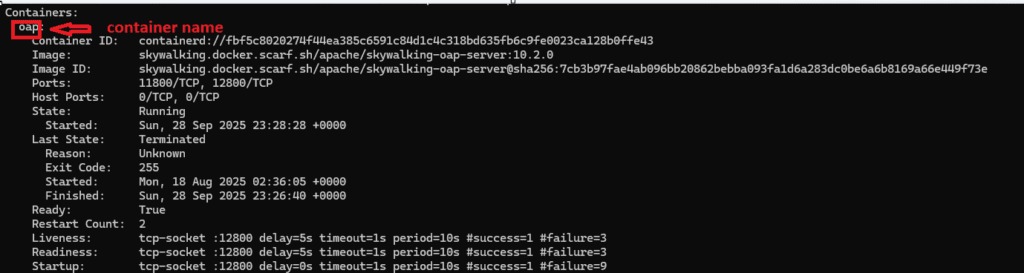
kubectl debug -it <pod-name> -n <namespace> --image=nicolaka/netshoot --target=<container-name>

# 접속 후 실행
ss -lntp  # 앱이 0.0.0.0으로 포트를 제대로 열었는지 확인

=> 이 외에 아래 명령어들로 프로세스와 네트워크등 상태를 살펴 볼 수 있다.
ex : ps, curl. ip a , ip route, ip neigh, nslookup, dig, printenv, df -h,
     free -m getent hosts 등
“Distroless란 실행 파일과 의존성만 포함하고 쉘이나 기본 유틸리티를 모두 제거한 이미지다. 보안은 강력하지만, 트러블슈팅을 위해서는 kubectl debug 가 필요하다”
해결: Probe 설정 수정 #
보통 앱 기동 시간이 설정보다 길어서 발생한다. initialDelaySeconds를 늘려주거나 헬스체크 경로를 수정한다.
#해당 pod 만든 컨트롤러 찾기
kubectl get pod <pod-name> -n <namespace> -o jsonpath='{.metadata.ownerReferences[0].kind}{" "}{.metadata.ownerReferences[0].name}{"\n"}'

#위 결과물로 보통 ReplicaSet이 나올거고. 많은 경우 Deployment가 원본이다
 물론 StatefulSet이 원본일수도 있지만.여기서는 deployment로 가정한다.
#ReplicaSet -> Deployment 역추적
kubectl get rs -n <namespace> | grep <replicaset-name>

#위 결과물로 나온 Deployment를 edit
kubectl edit deploy <deploy-name> -n <namespace>
readinessProbe:
httpGet:
path: /healthz
port: 8080
initialDelaySeconds: 30 # 앱이 뜨는 시간을 충분히 기다려준다요약 #
kubectl get pods에서 0/1인지 확인.describe로 Readiness probe failed 메시지 확인.- 앱 기동 시간을 고려해 initialDelaySeconds 조정.
Running은 컨테이너의 상태일 뿐, 서비스의 상태가 아니다.
🛠 마지막 수정일: 2025.12.22
💡 도움이 필요하신가요?
Zabbix, Kubernetes, 그리고 다양한 오픈소스 인프라 환경에 대한 구축, 운영, 최적화, 장애 분석,
광고 및 협업 제안이 필요하다면 언제든 편하게 연락 주세요.
📧 Contact: jikimy75@gmail.com
💼 Service: 구축 대행 | 성능 튜닝 | 장애 분석 컨설팅
📖 E-BooK [PDF] 전자책 (Gumroad):
Zabbix 엔터프라이즈 최적화 핸드북
블로그에서 다룬 Zabbix 관련 글들을 기반으로 실무 중심의 지침서로 재구성했습니다.
운영 환경에서 바로 적용할 수 있는 최적화·트러블슈팅 노하우까지 모두 포함되어 있습니다.
💡 Need Professional Support?
If you need deployment, optimization, or troubleshooting support for Zabbix, Kubernetes,
or any other open-source infrastructure in your production environment, or if you are interested in
sponsorships, ads, or technical collaboration, feel free to contact me anytime.
📧 Email: jikimy75@gmail.com
💼 Services: Deployment Support | Performance Tuning | Incident Analysis Consulting
📖 PDF eBook (Gumroad):
Zabbix Enterprise Optimization Handbook
A single, production-ready PDF that compiles my in-depth Zabbix and Kubernetes monitoring guides.


