1. What Is Steal CPU
There are cases where an application inside a virtual machine becomes slow even though CPU usage appears low.
In most of these situations, the root cause is Steal CPU occurring at the hypervisor level.
Steal CPU refers to the following condition:
A VM is fully ready to run at this moment,
but the hypervisor allocates CPU time to other VMs first,
causing the VM to wait instead of executing.
When CPU resources are insufficient, a VM stays in the “Runnable” state and the accumulated delay becomes Steal CPU.
2. Hypervisor CPU Sharing Structure
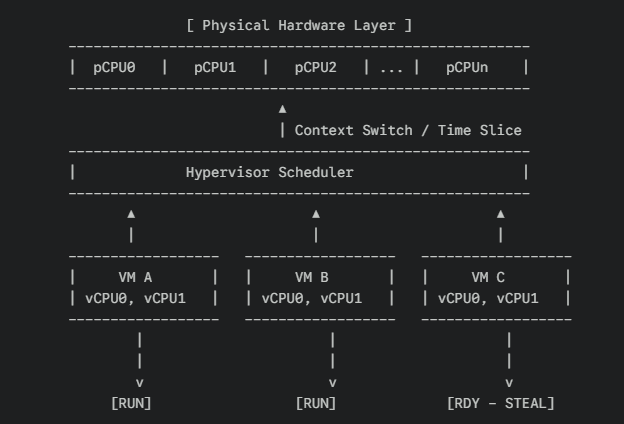
A vCPU is not a physical CPU.
The hypervisor assigns physical CPU (pCPU) time slices to vCPUs.
Even when a VM enters a Runnable (RDY) state, it can still be delayed if the pCPUs are busy.
This delayed period is Steal CPU.
3. vCPU Concept Overview
VM Environment
A vCPU is not a copy of a physical core; it is a logical CPU slot created by the hypervisor.
The number of vCPUs can exceed the number of physical cores, and the higher this ratio becomes, the more likely Steal CPU will occur.
Container Environment
Containers do not have the concept of vCPUs.
CPU constraints for containers are applied through cgroups distributing time on pCPUs (or vCPUs if running on a VM).
Here is a common point of confusion in real-world environments:
- Throttle: The VM receives CPU, but the container’s CPU limit prevents execution.
- Steal: The VM itself is not receiving CPU time because the hypervisor prioritizes other VMs.
These are completely different phenomena.
When containers run on top of VMs in cloud environments (EKS, GKE, etc.),
container throttling and VM-level Steal can overlap and cause mixed symptoms.
They must be diagnosed separately.
Bare Metal Environment
Only physical CPUs and threads exist, so the term vCPU does not apply.
4. What Steal CPU Indicates in Terms of Performance
Inside a VM, CPU idle may appear available while the application still slows down.
This is the typical symptom caused by Steal CPU.
| Steal% | Meaning |
|---|---|
| 0% | Normal |
| 1–5% | Light resource contention |
| 5–10% | Noticeable slowdown possible |
| 10–20% | Clear bottleneck |
| 20%+ | Physical CPU shortage; severe delay |
5. How Steal Occurs (Timeline)

RDY (Runnable) indicates that the VM is actively requesting CPU time.
If pCPUs are occupied by other VMs (A and B), VM3 continues to wait.
This period—“ready to run but not running”—is Steal CPU.
6. Why Steal CPU Frequently Occurs in AWS and Cloud Environments
AWS fundamentally operates as a multi-tenant environment.
A VM can be affected by the workload of other customer VMs placed on the same physical host.
Common Causes in Cloud Environments
Host Contention
Occurs when multiple VMs placed on the same host enter high load simultaneously.
CPU Credit Mechanics on T Series Instances
In Standard Mode, Steal CPU may increase when credits run out.
In Unlimited Mode, performance is maintained but additional charges apply.
Spot Instance Competition
Low-cost instance families with high oversubscription ratios
Basic Actions When Steal Is High on AWS
Stop → Start instead of reboot to move the instance to another host.
Check credits if using burstable (T series) instances.
Move to Compute Optimized families (C5/C6/C7).
Consider Dedicated Instances or Dedicated Hosts.
7. Causes of Steal in On-Prem KVM / VMware / Proxmox Environments
All virtualization platforms are affected by vCPU oversubscription,
but VMware represents Steal as CPU Ready Time instead.
Guest OS shows Steal, while vSphere shows Ready.
Major Causes
- Excessive vCPU oversubscription
- Noisy-neighbor VMs
- Ignoring NUMA policies
- CPU pinning conflicts
- Hypervisor internal process load
Immediate Mitigation
- Migrate the problematic VM to another host
- Reduce vCPU allocation or increase pCPUs
- Re-align NUMA configuration
- Remove or modify CPU pinning
- Isolate high-load VMs
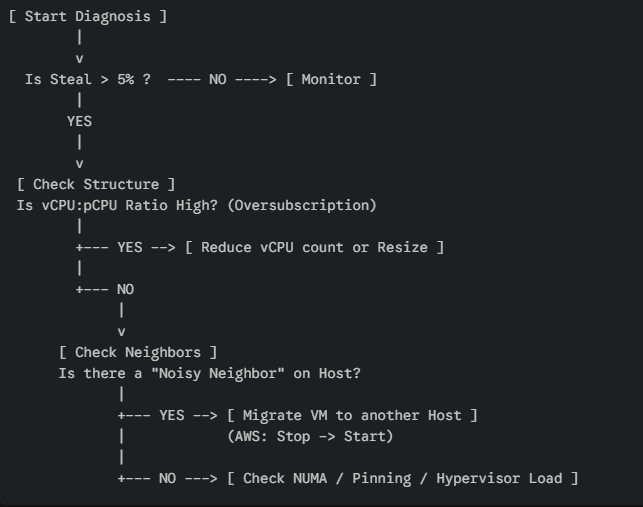
8. Steal CPU Troubleshooting Flow
9. Conclusion
Steal CPU is not just a number; it is a warning generated by the hypervisor.
It indicates insufficient physical CPU capacity, an incorrect vCPU layout,
or resource contention from other VMs on the same host.
Understanding container-level CPU throttling, AWS T series operating modes,
and VMware Ready Time helps evaluate Steal CPU more accurately.
The core principles behind Steal CPU are simple,
but in environments where hypervisors, VMs, containers, and cloud infrastructure are layered together,
understanding this structure is essential for resolving performance issues.
🛠 마지막 수정일: 2025.12.12
ⓒ 2025 엉뚱한 녀석의 블로그 [quirky guy's Blog]. All rights reserved. Unauthorized copying or redistribution of the text and images is prohibited. When sharing, please include the original source link.
💡 도움이 필요하신가요?
Zabbix, Kubernetes, 그리고 다양한 오픈소스 인프라 환경에 대한 구축, 운영, 최적화, 장애 분석,
광고 및 협업 제안이 필요하다면 언제든 편하게 연락 주세요.
📧 Contact: jikimy75@gmail.com
💼 Service: 구축 대행 | 성능 튜닝 | 장애 분석 컨설팅
📖 E-BooK [PDF] 전자책 (Gumroad):
Zabbix 엔터프라이즈 최적화 핸드북
블로그에서 다룬 Zabbix 관련 글들을 기반으로 실무 중심의 지침서로 재구성했습니다.
운영 환경에서 바로 적용할 수 있는 최적화·트러블슈팅 노하우까지 모두 포함되어 있습니다.
💡 Need Professional Support?
If you need deployment, optimization, or troubleshooting support for Zabbix, Kubernetes,
or any other open-source infrastructure in your production environment, or if you are interested in
sponsorships, ads, or technical collaboration, feel free to contact me anytime.
📧 Email: jikimy75@gmail.com
💼 Services: Deployment Support | Performance Tuning | Incident Analysis Consulting
📖 PDF eBook (Gumroad):
Zabbix Enterprise Optimization Handbook
A single, production-ready PDF that compiles my in-depth Zabbix and Kubernetes monitoring guides.
답글 남기기
댓글을 달기 위해서는 로그인해야합니다.