1. AWS CLI v2 Installation (Recommended Method)
Even after Terraform, AWS CLI continues to be required.
On Ubuntu, the most stable installation method is to use the official AWS installation package (v2).
Required utilities:
# apt update
# apt install -y curl unzip
Download AWS CLI v2:
# cd /usr/local/src
# curl "https://awscli.amazonaws.com/awscli-exe-linux-x86_64.zip" -o awscliv2.zip
Unzip:
# unzip awscliv2.zip
Install:
# ./aws/install
Verify:
# aws --versionIf the version is displayed as aws-cli/2.x.x, the installation is successful.

The apt install awscli method is convenient, but there is a high chance that an outdated version will be installed.
For lab environments, using v2 is recommended.
2. Required AWS Settings Check for the NAT Instance
This step must be checked directly in the AWS Console.
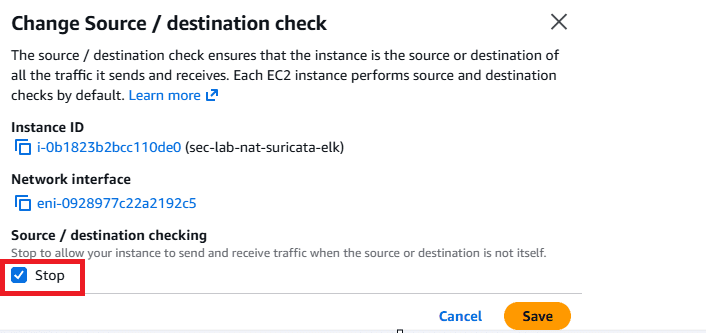
2.1 Disable Source / Destination Check
Because a NAT Instance must relay packets, this option must be disabled.
EC2 → Select NAT Instance
Actions → Networking → Change source/destination check
Stop: Verify that the checkbox is enabled

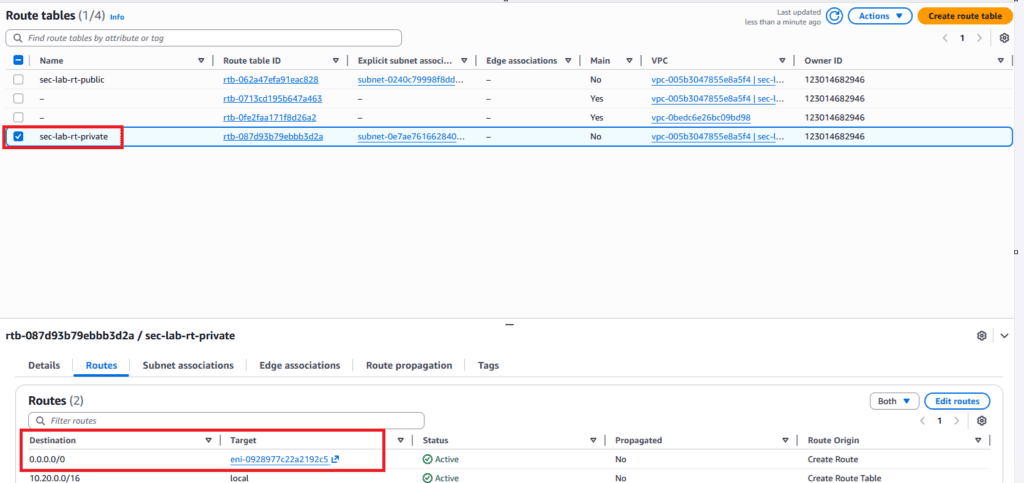
2.2 Private Subnet Routing Verification
In the route table of the Private Subnet, the following must be guaranteed:
0.0.0.0/0 → NAT Instance ENI
If this is not configured, all subsequent settings are meaningless.
3. NAT Instance OS Initial Setup
After SSH access to the NAT Instance, install basic packages.
# apt update
# apt install -y jq curl tcpdump ethtool iptables-persistent
tcpdump: for traffic flow verificationiptables-persistent: for permanent rule storage
: required for Suricata inline configuration
4. Enable IP Forwarding (Required)
Without this setting, NAT itself does not work.
Apply immediately:
# sysctl -w net.ipv4.ip_forward=1Apply permanently:
# echo 'net.ipv4.ip_forward=1' | tee /etc/sysctl.d/99-ipforward.conf
# sysctl --system
Verify:
# sysctl net.ipv4.ip_forward5. Relax rp_filter (Important in AWS Environments)
When using NAT + forwarding structures in AWS,
Reverse Path Filter (rp_filter) can cause valid packets to be dropped.
In lab and inline IPS environments, loose mode is safer.
rp_filter values:
0 (No Validation)
No checks.
Does not care whether the source IP of incoming packets is spoofed.
Not commonly used due to security concerns.
1 (Strict Mode)
“If it came in through this interface, it must go out through the same interface.”
If a packet enters through eth0, the response must also exit through eth0 to be considered valid.
Problem:
In complex network environments such as NAT or IPS, the incoming and outgoing paths can differ (asymmetric routing).
In this case, Strict mode (1) misinterprets the packet as spoofed and drops it.
2 (Loose Mode) – Recommended
“As long as there is some route.”
Even if a packet enters through eth0 and the response exits through eth1, it is allowed.
As long as there is a route to that IP in the routing table, the packet passes.
Why use it?
In AWS, NAT Instances and IPS setups frequently create asymmetric traffic paths.
Setting the value to 2 prevents unintended packet drops.
# cat <<'EOF' | tee /etc/sysctl.d/99-rpfilter.conf
net.ipv4.conf.all.rp_filter=2
net.ipv4.conf.default.rp_filter=2
EOF
# sysctl --system6. iptables: NAT + Inline (IDS/IPS) Traffic Path Preparation
This is the core of this part.
Goal
- Maintain Private Subnet internet communication using NAT (MASQUERADE)
- Insert an NFQUEUE hook into the FORWARD chain to prepare for Suricata inline processing
6.1 Variable Setup
Private Subnet CIDR (value created by Terraform):
# PRIVATE_CIDR="10.20.1.0/24"Auto-detect external interface (usually eth0):
# EXT_IF="$(ip route get 1.1.1.1 | awk '{for(i=1;i<=NF;i++) if($i=="dev"){print $(i+1); exit}}')"
# echo "PRIVATE_CIDR=$PRIVATE_CIDR"
# echo "EXT_IF=$EXT_IF"
6.2 NAT + Basic Forwarding Rules
Apply NAT rule:
# iptables -t nat -A POSTROUTING -s "$PRIVATE_CIDR" -o "$EXT_IF" -j MASQUERADEAllow forwarding:
# iptables -A FORWARD -s "$PRIVATE_CIDR" -j ACCEPT
# iptables -A FORWARD -d "$PRIVATE_CIDR" -m conntrack --ctstate ESTABLISHED,RELATED -j ACCEPT
At this point, it already functions as a normal NAT Instance.
6.3 Add NFQUEUE Hook for Suricata Inline Mode
Suricata is not installed yet.
Only the traffic path that allows packets to pass through Suricata is prepared in advance.
Important points:
- Initially used for IDS (detection) purposes
- Prevent outages if Suricata is down →
--queue-bypassis mandatory
Private → Internet:
# iptables -I FORWARD 1 -s "$PRIVATE_CIDR" -j NFQUEUE --queue-num 0 --queue-bypassInternet → Private (response traffic):
# iptables -I FORWARD 2 -d "$PRIVATE_CIDR" -j NFQUEUE --queue-num 0 --queue-bypassInternet HTTP → Private HTTP (response traffic):
# iptables -t nat -A PREROUTING -p tcp --dport 80 -j DNAT --to-destination 10.20.1.87:80 #apply private target web server IP6.4 Rule Verification
# iptables -vnL FORWARD --line-numbers
# iptables -t nat -vnL POSTROUTING --line-numbers
# iptables -t nat -L PREROUTING -n -v
Be sure to verify that the NFQUEUE rules are located at the top of the FORWARD chain.

6.5 Persist iptables Rules
# netfilter-persistent save
The rules will remain after reboot.
7. Current State Summary
At this point, the NAT Instance is in the following state:
- Private Subnet → Internet communication is normal
- All forwarded traffic passes through NFQUEUE (queue number 0)
- Traffic passes even without Suricata installed (
queue-bypass) - Inline IPS/IDS deployment preparation is complete
Preview of the Next Part (Part 3)
From the next part, Suricata will be installed.
- Suricata Inline mode (NFQUEUE) installation and related configuration
🛠 마지막 수정일: 2025.12.26
ⓒ 2026 엉뚱한 녀석의 블로그 [quirky guy's Blog]. All rights reserved. Unauthorized copying or redistribution of the text and images is prohibited. When sharing, please include the original source link.
💡 도움이 필요하신가요?
Zabbix, Kubernetes, 그리고 다양한 오픈소스 인프라 환경에 대한 구축, 운영, 최적화, 장애 분석,
광고 및 협업 제안이 필요하다면 언제든 편하게 연락 주세요.
📧 Contact: jikimy75@gmail.com
💼 Service: 구축 대행 | 성능 튜닝 | 장애 분석 컨설팅
📖 E-BooK [PDF] 전자책 (Gumroad):
Zabbix 엔터프라이즈 최적화 핸드북
블로그에서 다룬 Zabbix 관련 글들을 기반으로 실무 중심의 지침서로 재구성했습니다.
운영 환경에서 바로 적용할 수 있는 최적화·트러블슈팅 노하우까지 모두 포함되어 있습니다.
💡 Need Professional Support?
If you need deployment, optimization, or troubleshooting support for Zabbix, Kubernetes,
or any other open-source infrastructure in your production environment, or if you are interested in
sponsorships, ads, or technical collaboration, feel free to contact me anytime.
📧 Email: jikimy75@gmail.com
💼 Services: Deployment Support | Performance Tuning | Incident Analysis Consulting
📖 PDF eBook (Gumroad):
Zabbix Enterprise Optimization Handbook
A single, production-ready PDF that compiles my in-depth Zabbix and Kubernetes monitoring guides.
답글 남기기
댓글을 달기 위해서는 로그인해야합니다.